Category: Programing

  • สร้าง TABLE ใน SQL

    สร้าง TABLE ใน SQL

    1. How to สร้าง Table พร้อมคำอธิบาย
      1. การกำหนด Primary Key (PK) และ Foreign Key (FK)
        1. Table customer
        2. Table order
    2. How to Insert Data
      1. ใส่ข้อมูลลูกค้า
      2. ใส่ข้อมูลคำสั่งซื้อ

    How to สร้าง Table พร้อมคำอธิบาย

    การกำหนด Primary Key (PK) และ Foreign Key (FK)

    CREATE TABLE customer (
        customer_id INT PRIMARY KEY, 
        name VARCHAR(100) NOT NULL,   
        email VARCHAR(100) UNIQUE
    );
    
    CREATE TABLE orders (
        order_id INT PRIMARY KEY, 
        customer_id INT,
        order_date DATE NOT NULL,      
        amount DECIMAL(10,2) NOT NULL,
        FOREIGN KEY (customer_id) REFERENCES customer(customer_id)
    );

    Table customer

    • customer_id เป็น Primary Key (PK)
    ชื่อคอลัมน์คำอธิบาย
    customer_idเป็น Primary key ห้ามเป็น NULL
    name(100)ห้ามเป็น NULL (ต้องมีชื่อและจำกัด 100ตัวอักษร)
    emailว่างไว้ได้และทำให้ email ห้ามซ้ำกัน
    table customer

    Table order

    • order_id เป็น Primary Key (PK)
    • customer_id ในตาราง order เป็น Foreign Key (FK) ที่อ้างอิงไปที่ customer_id ใน customer
    ชื่อคอลัมน์คำอธิบาย
    order_idเป็น PRIMARY KEY
    customer_idเป็นFOREIGN KEY
    order_dateต้องมีวันที่สั่งซื้อ
    amountต้องมีจำนวนเงิน (ห้ามเว้นว่าง)

    How to Insert Data

    ใส่ข้อมูลลูกค้า

    INSERT INTO orders (order_id, customer_id, order_date, amount) VALUES
    (101, 1, '2024-02-01', 150.50),
    (102, NULL, '2024-02-05', 200.00),
    (103, 2, '2024-02-10', 99.99),
    (104, 3, '2024-02-15', 75.25),
    (105, 5, '2024-02-20', 300.00),
    (106, 6, '2024-02-25', 50.00),
    (107, 1, '2024-03-01', 120.75),
    (108, 4, '2024-03-05', 199.99);

    ใส่ข้อมูลคำสั่งซื้อ

    INSERT INTO orders (order_id, customer_id, order_date, amount) VALUES
    (101, 1, '2024-02-01', 150.50),
    (102, NULL, '2024-02-05', 200.00),
    (103, 2, '2024-02-10', 99.99),
    (104, 3, '2024-02-15', 75.25),
    (105, 5, '2024-02-20', 300.00),
    (106, 6, '2024-02-25', 50.00),
    (107, 1, '2024-03-01', 120.75),
    (108, 4, '2024-03-05', 199.99);

    เท่านี้เราก็จะได้ TABLE customers และ order ของเราเองเอาไว้ต่อยอดได้แล้วครับ ^^

  • สร้าง Visualization ใน R ด้วย ggplot2

    สร้าง Visualization ใน R ด้วย ggplot2

    1. ggplot2
      1. ตัวอย่างกราฟที่สร้างด้วย library(ggplot2)
    2. การสร้างกราฟใน R ด้วย ggplot2
      1. 1. ตัวแปร Discrete
        1. ตัวอย่างเช่น
      2. 2.ตัวแปร Continuous
        1. ตัวอย่างเช่น
    3. Mapping and Setting
      1. Mapping vs. Setting ใช้ต่างกันยังไง
        1. “Mapping”
        2. “Setting”
    4. ตัวอย่างการเขียนโค้ดเบื้องต้น
      1. Histogram
      2. Scatterplot

    ggplot2

    ggplot2 cheat sheet

    ggplot2 เป็น หนึ่งใน library(tidy verse) ที่สามาร plot กราฟออกมาได้หลากหลายรูปแบบมากไม่ว่าจะเป็น

    • Histogram
    • Bar plot
    • Scatter plot
    • Box plot
    • Violin plot
    • etc.

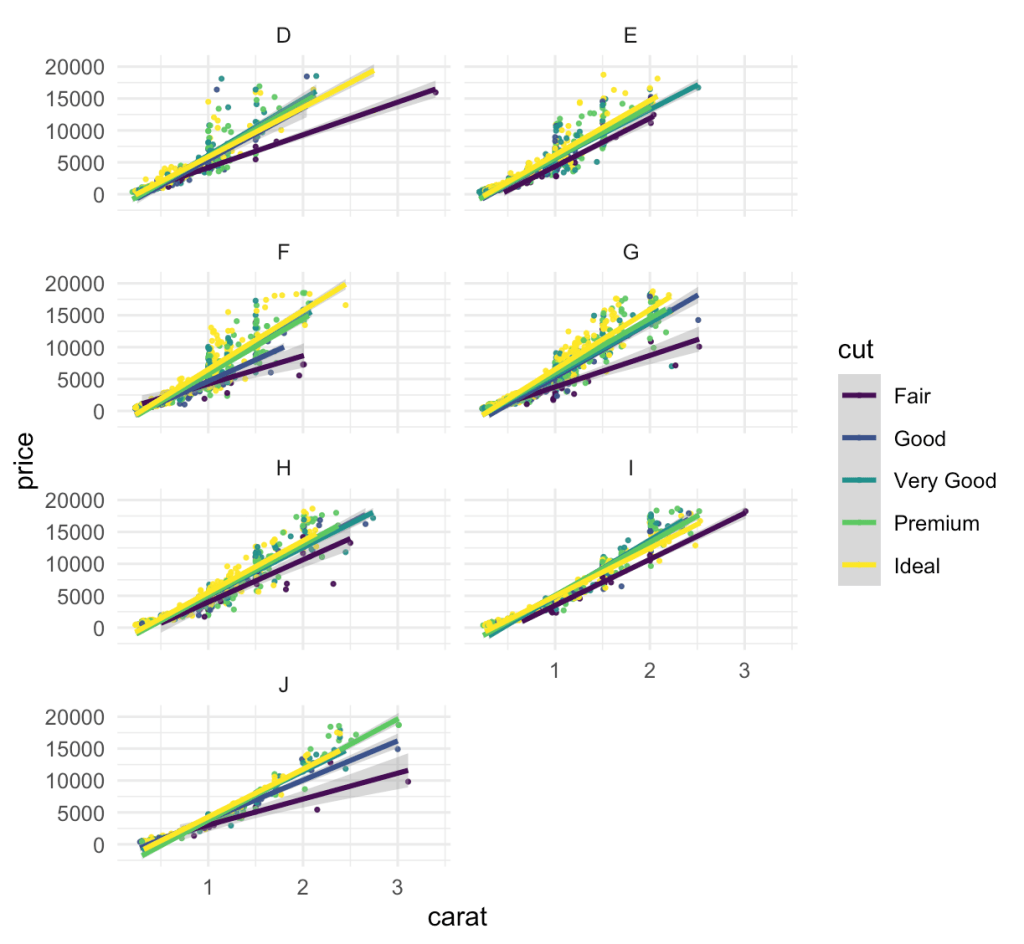
    ตัวอย่างกราฟที่สร้างด้วย library(ggplot2)

    การสร้างกราฟใน R ด้วย ggplot2

    การสร้างกราฟด้วย ggplot2 นั้น ตัวโค้ดจริงนั้นไม่ยากครับ เพียงแต่ว่าเราต้องเลือกกราฟให้ถูกกับตัวแปรที่เราจะนำไป plot ซึ่งแบ่งหลักๆออกเป็น 2 ประเภทอิงจาก ggplot2 cheat sheet เลย

    1. ตัวแปร Discrete

    ตัวแปร Discrete แปรตรงตัว ก็คือ ตัวแปรไม่ต่อเนื่อง แล้ว…? ไม่ต่อเนื่องแบบไหนล่ะ

    คือ การที่มันนับแบบ 1 2 3 4 ได้ จะไม่มีค่าระหว่างเลขสองตัวแบบ 1 และ 2 ก็จะไม่มี 1.23 หรือ 1.86 แบบนี้ ซึ่งการที่มันไม่มีค่าระหว่างเลขสองตัวแบบนี้เนี่ย ทำให้การนับ เป็นไปอย่างจำกัด เช่น จะไม่มีค่ามาทำนอง 1.3333… ซ้ำไปแบบไม่รู้จบ

    ตัวอย่างเช่น

    • จำนวนสินค้าที่ขายได้ในแต่ละวัน
    • จำนวนนักเรียนในห้องเรียน(คือจะไม่มีมาแบบ 3.5 คน แบบนี้ไม่มี)
    • จำนวนหน้าลูกเต๋า
    • จำนวนประเทศในโลก
    • จำนวนต้นไม่ในป่า

    2.ตัวแปร Continuous

    ตัวแปร Continuos ก็คือแบบต่อเนื่อง ตรงข้ามกับแบบ Discrete เลย

    คือ จะมีช่วงของค่าที่ไม่จำกัด เช่น 1.33333333….. ได้แบบนี้เรียก Continous ยกตัวอย่างจะเข้าใจง่ายขึ้น

    ตัวอย่างเช่น

    • น้ำหนัก 10.23425…. กิโลกรัม แบบนี้ Continuos เลย
    • ระยะทาง 3.1234444… กิโลเมตร
    • ความสูงของคน 170.455 cm
    • อุณหภมิ 18.23 องศาเซลเซียส

    พอเข้าใจ Discrete และ Continuous เราก็มาเทียบกับ ggplot2 cheat sheet ได้ไม่ยากแล้ว

    Mapping and Setting

    Mapping กับ Setting เป็นอีกเรื่องนึงที่สำคัญหากจะเริ่มต้นลงมือเขียนโค้ด

    Mapping vs. Setting ใช้ต่างกันยังไง

    “Mapping”

    เป็นเหมือน base ที่ยังไม่มีรูปร่างหรือกราฟ ซึ่ง mapping จะผูกติดอยู่กับข้อมูล เช่น

    ggplot(data = mtcars, aes(x = wt, y = mpg, color = factor(cyl))) และจะอยู่ใน aes(...) เสมอ

    “Setting”

    คือ การซ้อนหน้าตาของกราฟลงไป ซึ่งไม่ผูกติดกับข้อมูล เช่น

    ggplot(data = mtcars, aes(x = wt, y = mpg)) + geom_point(color = "blue") คือ ซ้อน กราฟ scatter plot ลงที่ชุดข้อมูล และ ให้จุดแต่ละจุดเป็นสีฟ้าโดยไม่สนใจว่าเป็นข้อมูลชนิดหรือประเภทอะไร

    ตัวอย่างการเขียนโค้ดเบื้องต้น

    อันดับแรกติดตั้ง library(ggplot2) แต่ส่วนตัวผมถนัดติดตั้ง library(tidyverse) เลย และแน่นอน ตัวอย่าง dataset เริ่มต้นของเรา “mtcars”

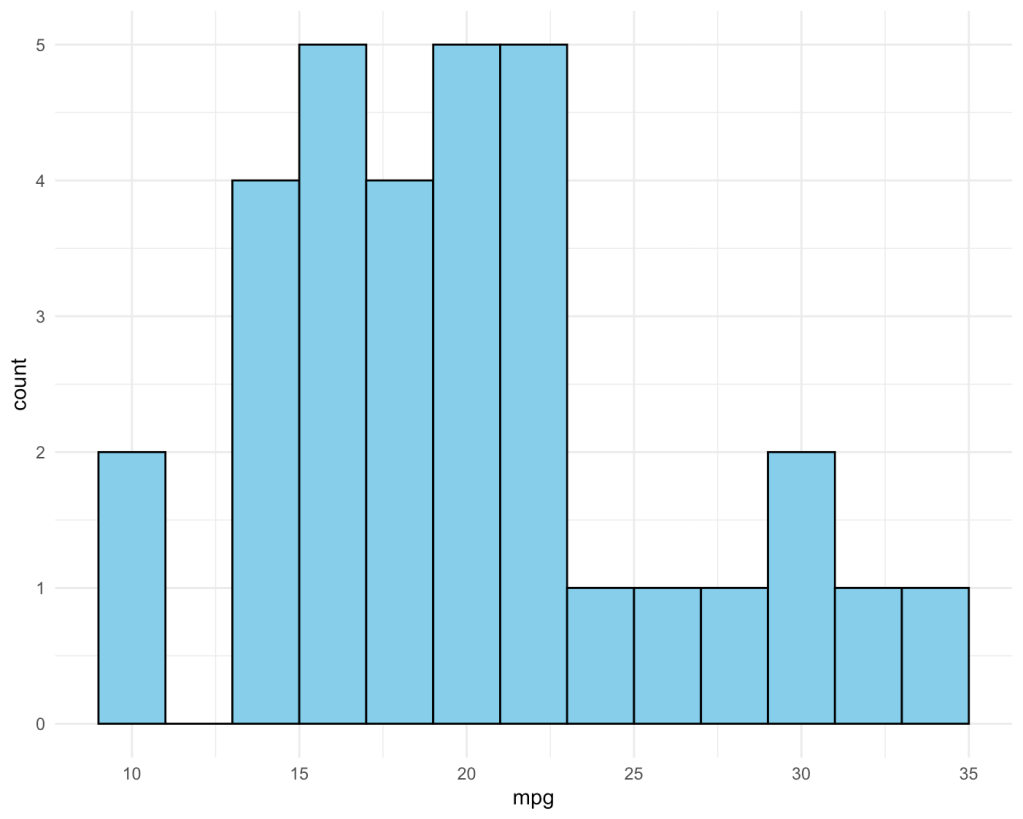
    Histogram

    ggplot(mtcars, aes(x = mpg)) +
      geom_histogram(binwidth = 2, fill = "skyblue", color = "black") +
      theme_minimal()

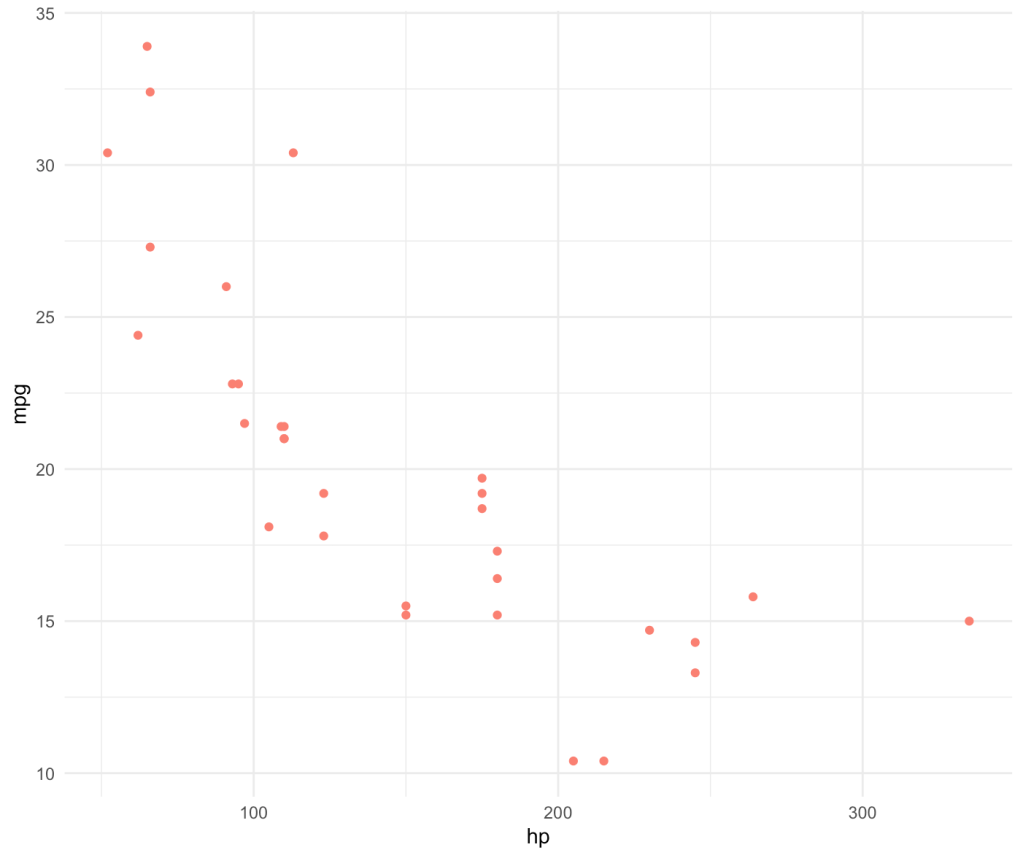
    Scatterplot

    mtcars %>%
      select(mpg, hp) %>%
      ggplot(mapping = aes(x = hp,
                           y = mpg)) +
      geom_point(col = "salmon") +
      theme_minimal()
  • Data Transformation in R

    Data Transformation in R

    1. 5 functions หลักของ dplyr ประกอบด้วย
    2. Example Core Function in dplyr

    Data Analyst prefer “LONG format”

    Typical workflow ของ data analyst ที่เขียน R คือ

    • ดึงข้อมูลจาก SQL databases หรือ data format ต่างๆเข้าสู่ R
    • เขียน dplyr เพื่อจัดการ data frame จะ merge, join, union, transform
    • ส่ง transformed data ให้ users ของเรา (e.g. csvexceljson) หรือส่งไปให้ software อื่นๆใช้งานต่อ เช่น Power BI, Tableau, Google Sheets, Data Studio

    Cr.แอดทอย

    5 functions หลักของ dplyr ประกอบด้วย

    • select() ใช้เลือกคอลัมน์
    • filter() Large dataset “filter()” first**
    • mutate() create new column
    • arrange() ใช้sort data
    • summarise() อันนี้เขียนได้สองแบบ summarize()

    Example Core Function in dplyr

    select() ใช้เลือกคอลัมน์
    select(imdb, MOVIE_NAME, RATING)
    select(imdb, 1, 5)
    
    select(imdb, movie_name = MOVIE_NAME, 
           released_year = YEAR)
    imdb %>%
      select(movie_name = MOVIE_NAME, 
             released_year = YEAR)
    filter() ใช้ filter data หรือสร้างเงื่อนไขในการเลือกdata ในSQL ใช้ quary WHERE
    mtcars %>%
      filter(disp %in% c(160, 108,225))
    
    imdb %>% 
      select(2, 3, 7) %>%
      filter(score >= 9 & year > 2000)
      
      imdb %>%
      select(movie_name, genre, rating) %>%
      filter(genre == "Drama")#ส่งค่ากลับมาแค่"Drama"อย่างเดียว
      
      imdb %>%
      select(movie_name, genre, rating) %>%
      filter(grepl("Drama", imdb$genre))#ส่งค่าที่มี"Drama"อยู่ร่วมกับคำอื่นด้วย
    mutate() create new column
    imdb %>%
      mutate(score_group = if_else(score >= 9, "High Rating", "Low Rating"),
             langth_group = if_else(length >= 120, "Long Movie", "Short Movie")) %>%
    	select(movie_name, score_group, langth_group)
    	
    imdb %>%
      select(movie_name, score) %>%
      mutate(score = score + 0.1)#เขียนทับคอลลัมน์เดิมได้
      
     mtcars %>%
      select(hp, wt) %>%
      mutate(hp_double = hp*2,
             hp_halve = hp/2,
             hp_add_five = hp+5,
             new = hp/wt,
             newna = hp+wt)
    arrange() ใช้sort data
    m%>%
      select(model, am, hp) %>%
      arrange(desc(model))
    
    m %>%
      select(model, am, hp) %>%
      ## "(-)" as descending order(only nummeric)
      arrange(am, -hp)
    summarise()
    imdb %>%
      summarise(mean_length = mean(length),
                sum_length = sum(length),
                sd_length = sd(length),
                min_length = min(length),
                max_length = max(length),
                n = n())
    
    m %>%
      select(am, hp) %>%
      summarise(avg_hp = mean(hp),
                sum_hp = sum(hp),
                med_hp = median(hp),
                sd_hp = sd(hp),
                var_hp = var(hp),
                n = n())

  • My Pao-Ying-Chub in Python

    My Pao-Ying-Chub in Python

    เปิดเพื่อแสดงโค้ด Pythonที่อยู่ด้านใน
    def game_start():
        import pandas as pd
        import numpy as np
        from random import choice
        n = 0
        round_game = 0
        play = True
    
        #Create score table
        user_score = 0
        com_score = 0
    
        ##create Playcontrol fuction
        def play_ctrl():
            print("Would you like to play again?(y/n)")
            user_r = input("Please select y or n :").lower()
    
            #check value
            if user_r == 'y':
                return True
            elif user_r == 'n':
                return False
            else:
                print("Your answer is wrong, please select only 'y' or 'n'")
                return play_ctrl()
    
        ## Number of Round
        def number_round():
            nonlocal n
    
            try:
    
                # question to User
                print("How many round would you like to play?")
    
                #Get value
                n = int(input("Please select a round to play :"))
    
                #Check value
                if pd.isna(n) or int(n) < 1:
                        print("Please enter a number greater than zero.")
                        return number_round()
    
                else:
                    return n
    
            except:
                print("Your answer is wrong, please select only number.")
                return number_round()
        def core_game():
            nonlocal round_game
            nonlocal com_score
            nonlocal user_score
            #Create List action
            action_list = [" ","ค้อน", "กรรไกร", "กระดาษ"]
            def choice_rand(): 
                 print("""What is your choice?
                    1 : Hammer
                    2 : Scissors
                    3 : Paper""")
                 try:
                    user_choice = int(input("Please select a number (1-3) :"))  
                    if user_choice < 1 or user_choice > 3:
                        print("Your answer is wrong, please select only number 1-3")
                        return choice_rand()
                    else:
                        return user_choice
                 except ValueError:
                    print("pleas select again")
                    return choice_rand()
                   
            
            while round_game < n:
                    print(f"-----Round : {round_game + 1}-----")
                    com_action = np.random.randint(1,4)
                    user_action = choice_rand()
                    round_game += 1 
                    print("🔥🔥🔥🔥🔥Battle Start🔥🔥🔥🔥🔥")
                    print(f"🙋Your choice: {action_list[user_action]}")
                    print(f"🖥️Computer choice: {action_list[com_action]}")
                    if  (user_action == 1 and com_action == 2) or\
                        (user_action == 2 and com_action == 3) or\
                        (user_action == 3 and com_action == 1):
                         print("-----You win🏆-----")
                         user_score += 1
                    elif user_action == com_action:
                         print("-----Tie-----")
                    else:
                         print("-----You lose💀-----")
                         com_score += 1
                    print("""
                                  """)
            # show result
            print("""=== Final Score ===
                  
                  """)
            print(f"Your score is : {user_score}")
            print(f"Computer score is : {com_score}")
            print("""Fianal Battle is :""")
            print("=== You win ===" if user_score > com_score  else "=== You lose ===" if user_score < com_score else "=== Tie ===")
        
        number_round()
        core_game()
        play_0 = play_ctrl()
        if play_0:
             return game_start()
        else:
             print("Thak you")
        
    
    game_start()

    เป้าหมายและผลลัพธ์

    1.รับจำนวนรอบที่ผู้เล่นต้องการ โดยผ่านคำสั่ง number_round()

    2.ผู้เล่นสามารถเลือกว่าจะออกอะไรและคอมสามารถสุ่มตัวเลือกมาสู้กับผู้เล่นได้

    3.แสดงผลแพ้/ชนะ/เสมอในแต่ละรอบ และสรุปผลแพ้ ชนะได้ตอนจบเกม

    4.เก็บคะแนนทั้งสองฝั่งเอาไว้แสดงตอนท้าย

    5.ถามตอนผู้เล่นจนครบรูปที่ต้องการแล้ว ว่าต้องการเล่นใหม่อีกครั้งหรือไม่ผ่าน play_control()


    คำอธิบายเพิ่มเติม

    ใน project นี้ผมได้ปล่อยให้มี typo เอาไว้บางคำ แต่เกมจะยังรันได้ปกติ ซึ่งtypoที่เกิดขึ้นนั้น จะอยู่ในส่วนของการแสดงผลเพียงเท่านั้น เช่น คำว่า “Thank you” -> “Thak you”

    โดยผู้อ่านสามารถ copy code ของผมไปลองเล่นผ่าน google colab และกดรัน code ได้เลยโดยที่ไม่ต้องทำอะไรเพิ่มเติม